8 Best Shopify Toy Store Themes 2026
Last modified: June 1, 2026
| # | Image | Name | |
|---|---|---|---|
| 1 |
|
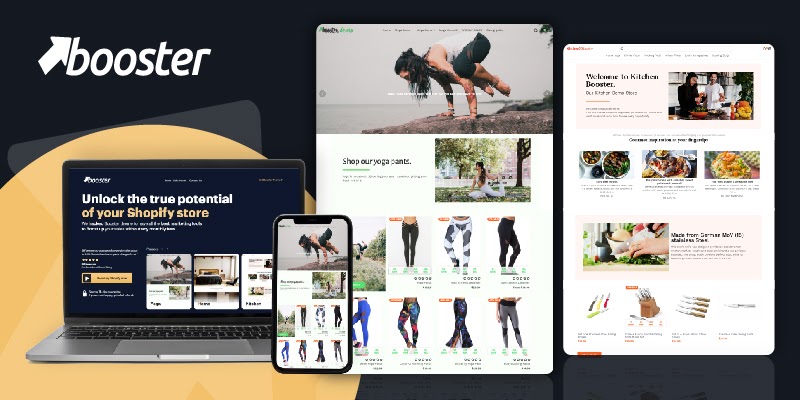
Booster
|
|
| 2 |
|
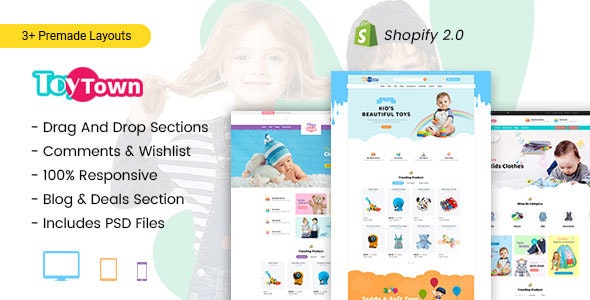
Toytown
|
|
| 3 |
|
Baby Planet
|
|
| 4 |
|
Kutty Kids
|
|
| 5 |
|
Toyc
|
|
| 6 |
|
Magic World
|
|
| 7 |
|
Kinder
|
|
| 8 |
|
Sunrise
|
|
|
Show More
|
|||
Quick Comparison
| Theme | Best For | Cost |
|---|---|---|
| Booster | Established toy stores, subscriptions, conversion features | Premium |
| Toytown | Toy-specific layouts, age filtering native | Premium |
| Baby Planet | Baby-led catalogs (0-2 years focus) | Premium |
| Kutty Kids | Kids’ clothes + toys combined catalogs | Premium |
| Toyc | Lower-cost option, basic toy layout | Premium (low end) |
| Magic World | Fantasy/themed toys, story-driven brands | Premium |
| Kinder | Educational toys, parent-trust-led aesthetic | Premium |
| Sunrise | Lightweight flexible toy theme | Premium |
Our rankings aren't just opinions. They are based on proprietary detection data from 3.5 million+ Shopify stores, aggregated daily since 2017.
Booster

Booster is fast and it comes packed with features.
The theme includes countdown timers, call-to-action builders, social proof, popup builders and more. Marketing add-ons, easy to use multi-currency and more.
Toys can fit great into the Booster theme.
Booster Highlights:
- Save more than $3000 on apps with so many built-in features.
- Looks great on mobile
- Rank higher with better SEO functionality.
- Easy-to-use theme design tools for a smoother website building experience.
Toytown
If you’re looking for a toy store theme that caters specifically for younger children, then this is one of the best toy store Shopify themes on our list. With drag and drop interface you can customize the three home page styles. The theme is perfectly designed for younger children with the clean, light color scheme, kid-orientated typography and the shopping functions.
You can sell lots of kids related products including, barbie doll clothing, kid related clothing, toys and educational equipment. You can also enhance this theme with the Shopify app store.
For shoppers there is a blog section, coupon area, and wishlists, so they can plan their purchases. There are also comment sections and reviews to build trust between you and your audience.
Its functionality is great. It is compatible with all browsers and the responsive designs makes it a perfect website for use on mobile devices and desktops. You can also add a great looking slider with images and you can add an unlimited number of banners for your store.
Toytown Highlights:
- Sliders for multiple hero banners
- Colorful built-in design that’s customizable
- Can highlight the end of deals with a countdown timer.
- Convert visitors with brand reviews on your store.
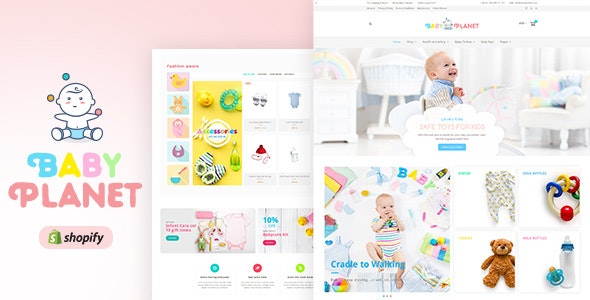
Baby Planet
Baby Planet is another playful theme that can be used by brands selling toys, baby, kids clothing and other accessories. This mobile-friendly theme looks great on any device with neutral colors for younger children. The theme can be customized with beautifully developed and professionally designed elements that can add functionality to your website as boost engagement.
To help visitors around your website mega menus guide the way. Superior navigation is linked to improved user experiences and if you create the right signposts in your mega menu, you can increase revenue.
In addition, there are several aspects of the toy shop Shopify theme that allow users to search for products on your site. Therefore, if you have a large catalog of products, this might be the theme for you. This is also a great theme for those trading across the world. There is a fantastic currency exchange system that allows you to display prices across the world.
Baby Planet Highlights:
- Great for large catalogs of products like toys
- Newsletter popup to help you capture the details of visitors.
- Order tracking functions available.
- Drag and drop home page blocks.
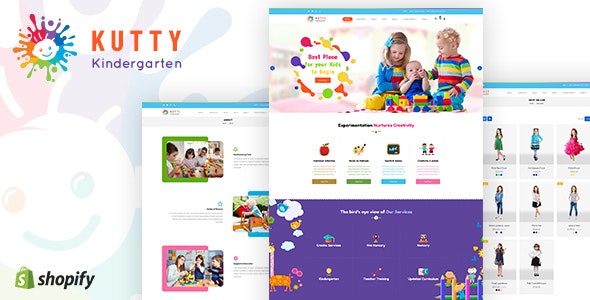
Kutty Kids
This Shopify toy shop theme is aimed at a little older age group and the colors of the basic theme do match. The colors are brighter to attract that specific market. For the theme, there is a lot of functionality that makes it a prime choice as a toy shop for young school children. First, there are five styles of mega menu to help visitors navigate around your toy store. In addition, there is search functionality and newsletter popup.
In addition to this there’s a quick view for customers who want to see products while still on the main toy shop page. You can also display products in a grid or list format, whatever your preference. A grid format is best if you have lots of toys and products.
A countdown timer that will put urgency into deals. There is also a reviews app that can help build visitor trust.
Kutty Kids Highlights:
- A suite of on-site built-in features.
- Easy international set up.
- Wishlist functionality, a must-have for toy stores.
- Can build a mailing list quickly
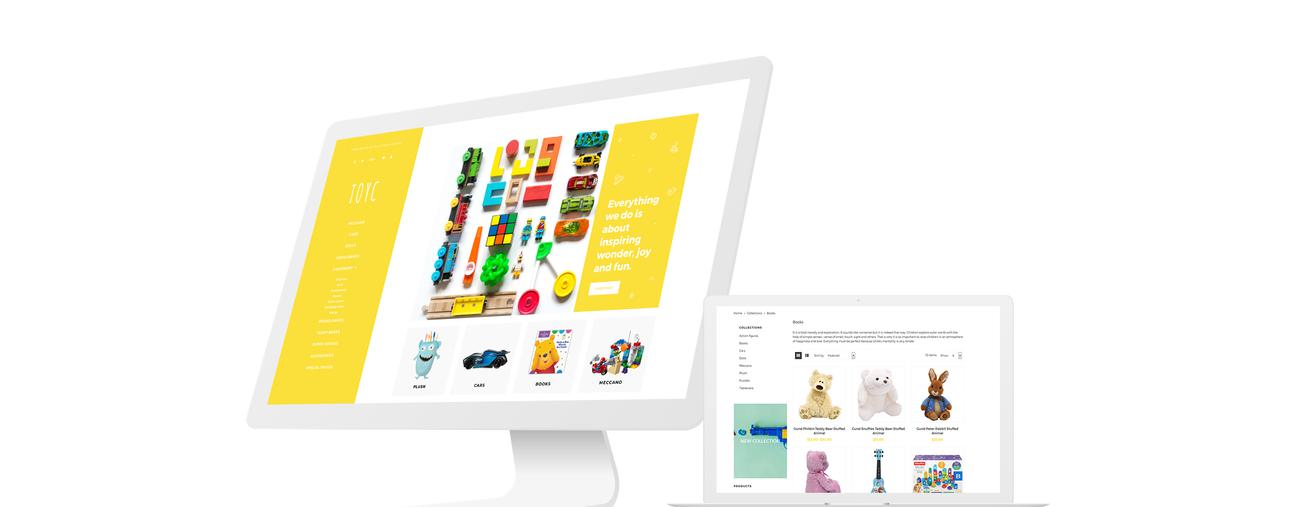
Toyc
This vibrant theme offers lots of different styles for your website that will make it an excellent choice for your toy store. The theme itself has a clean and minimalist design that makes it fast to load and improves your customer experience. This leads to higher revenue in both terms of less carts being abandoned and higher revenue per order.
The theme is also multilingual and currency, so you can also sell internationally.
Toyc Highlights:
- Clean code making the website extremely fast .
- Built-in multilingual
- Marketing add-ons help revenue
- Wishlist functionality for your store.
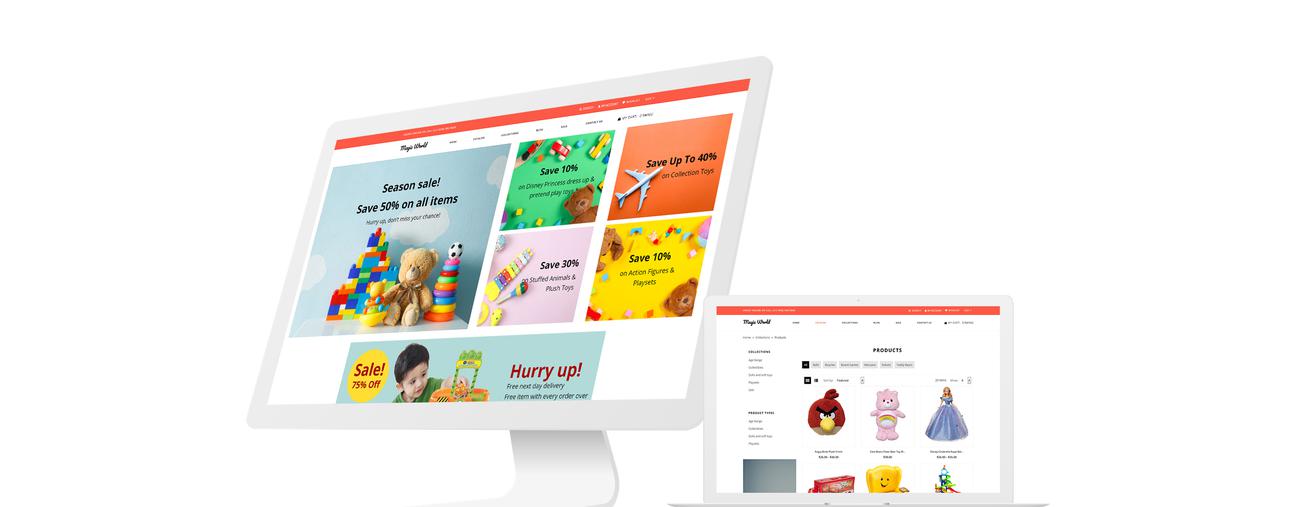
Magic World
Magic World is spritely theme for toy stores with a visual touch.
Mobile, search, and navigation is all on point for a toy store.
You can keep visitors informed about the latest news, releases and offers through the integrated blog. Blogs are also a creative way to improve traffic to your website. .
The slider is functional and beautiful and the grid is easy on the eyes.
Magic World Highlights:
- Sell in many countries with multilingual and multi-currency functionality.
- Lots of marketing add-on options giving you new ways to reach your customers.
- Let customers find your products thanks to well-designed navigation
- Clean code helping the site to be highly responsive, fast, and rank well on search engines.
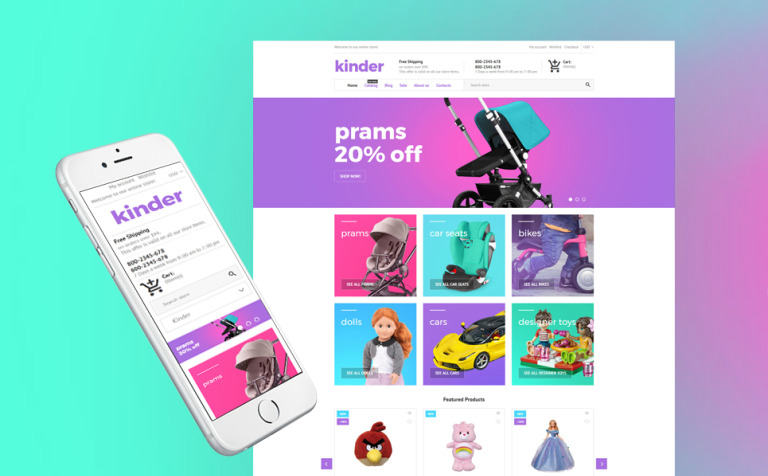
Kinder
Make your website perfectly fit your other branding thanks to the excellent customization options that are available through Kinder, an upbeat and colorful toy shop Shopify theme. This theme allows you to change the color scheme of the website with one click, making branding easy. If you’re a new business and struggling for photos, you can use the free stock photos that are included with your theme.
To help you sell, there is a big slider function on the theme that flows naturally on your website. You can also sell internationally thanks to the multi-currency options that are included within the coding of the theme. You can also push specific products by assigning them certain badges such as sale discounts, new in or best seller tags. This can really increase conversions on certain products.
Customer expectations will be surpassed thanks to neat features such as the sorting options which changes the order of the products without the need to reload the page. This makes the shopping experience much more streamlined for your audience.
Kinder Highlights:
- Blog elements to help you maintain visitor engagement and better SEO results.
- Responsive website theme so it will display well on any device seamlessly.
- Has online chat facilities.
- Responsive so will display perfectly on any device.
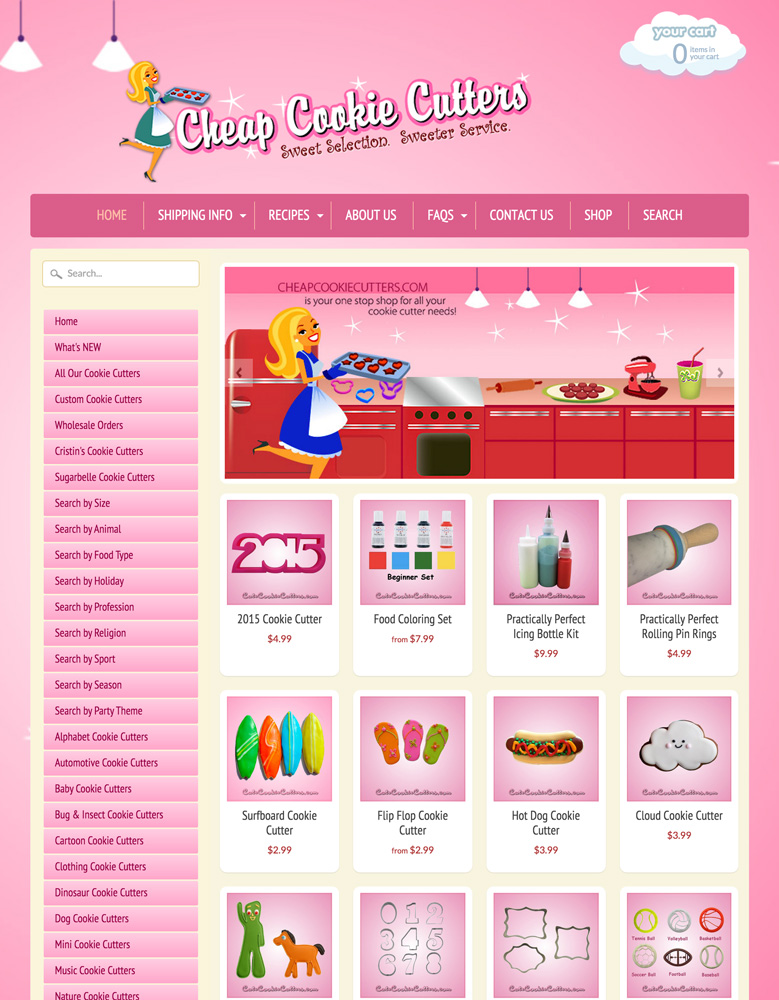
Sunrise
Sunrise might not just be used by toy stores, but it is a perfect theme for an online toy shop. The bright colors, intriguing design and excellent functionality of the theme make it an excellent choice for those with lots of products.
To promote your latest deal, sale or other information, you can take advantage of the promotional banner. This neat feature will help you convert more of your customers with simple messages that create urgency. You can further enhance the shopping experience for website visitors when you use the slideshow function that allows you to showcase multiple branded pictures or products on your homepage. These can be linked to specific products/pages for your visitors to find out more information.
To help with user navigation you can have a multilevel menu. This helps customers find the products they want faster and looks really good. When customers do find the products they’re looking for, they can have a closer look by clicking on and then zooming in on the product images.
Sunrise Highlights:
- An excellent theme with four different styles and lots of functionality.
- Use grid-style layouts to improve your website’s look.
- Search engine optimized to help you appear in search results.
- Quick speed for fast loading.
-
Do these themes support multi-language and multi-currency features for international customers?
Yes, many Shopify themes support multi-language and multi-currency features. They are designed to cater to a global audience, ensuring a tailored shopping experience for international customers.
-
What kind of customer support and updates can be expected after purchasing one of these themes?
Customers can expect responsive and comprehensive support after purchasing these themes, ensuring any issues are promptly addressed and resolved. Additionally, regular updates are provided to enhance functionality, security, and performance, ensuring the online store remains current and competitive.
-
Are these toy store Shopify themes mobile responsive and optimized for various screen sizes?
Absolutely, these toy store Shopify themes are meticulously designed to be mobile responsive. They ensure optimal viewing and interaction experience, easily adapting to various screen sizes from desktops to tablets and smartphones.
What Are You Looking For In Shopify Toy Store Themes?
Ready to turn your toy store into a magical wonderland? The Best Toy Store Shopify Themes can help you do just that! Whether you’re offering cuddly plushies, educational kits, or the latest action figures, the right theme can make your online store a captivating playground for both kids and parents.
Here’s why these themes are perfect for your toy store:
- Vibrant and Playful Designs: Bring out the fun with colorful, engaging visuals that make your products pop and put a smile on every face.
- Easy Navigation: Create a smooth shopping experience with intuitive layouts that guide customers effortlessly to their favorite toys.
- Product Showcases: Use high-quality images and dynamic displays to put your toys in the spotlight, showing them off from every angle.
- Customizable Sections: Customize your store’s look and feel with flexible templates that let you highlight new arrivals, best sellers, and special promotions.
- Mobile Optimization: Ensure your store looks fantastic and works perfectly on all devices, from desktops to smartphones.
- SEO-Friendly Features: Increase your visibility with built-in SEO tools that help your toy store rank higher in search results.
- Secure Payment Options: Offer peace of mind with reliable and secure payment gateways for a smooth checkout process.
- Customer Reviews and Ratings: Build trust by showcasing customer feedback and reviews, helping parents make informed choices.
- Interactive Elements: Add playful animations and interactive features to engage your audience and make their shopping experience more fun.
Conclusion: 8 Best Toy Store Shopify Themes
The right Shopify theme for your toy store strikes the balance between playful and practical, capturing the excitement of your products while making it easy for parents to find exactly what they’re looking for.
The themes covered in this guide each bring something different to the table, so the best choice comes down to your store’s style, your product range, and the experience you want to create. Pick the one that fits your brand, customize it to match your vision, and give every visitor a shopping experience worth coming back for.
These themes have it all-intuitive navigation, high-quality product displays, seamless mobile optimization, and customizable sections. It’s like having a store that’s both fun and professional. If you liked this post about toy stores, you might also like baby themes or children’s clothing themes.
The right Shopify theme for your toy store strikes the balance between playful and practical, capturing the excitement of your products while making it easy for parents to find exactly what they’re looking for. The themes covered in this guide each bring something different to the table, so the best choice comes down to your store’s style, your product range, and the experience you want to create.
Pick the one that fits your brand, customize it to match your vision, and give every visitor a shopping experience worth coming back for.